Complete AI-901 Study Guide 2026: How to Pass Azure AI Fundamentals

skilltech club
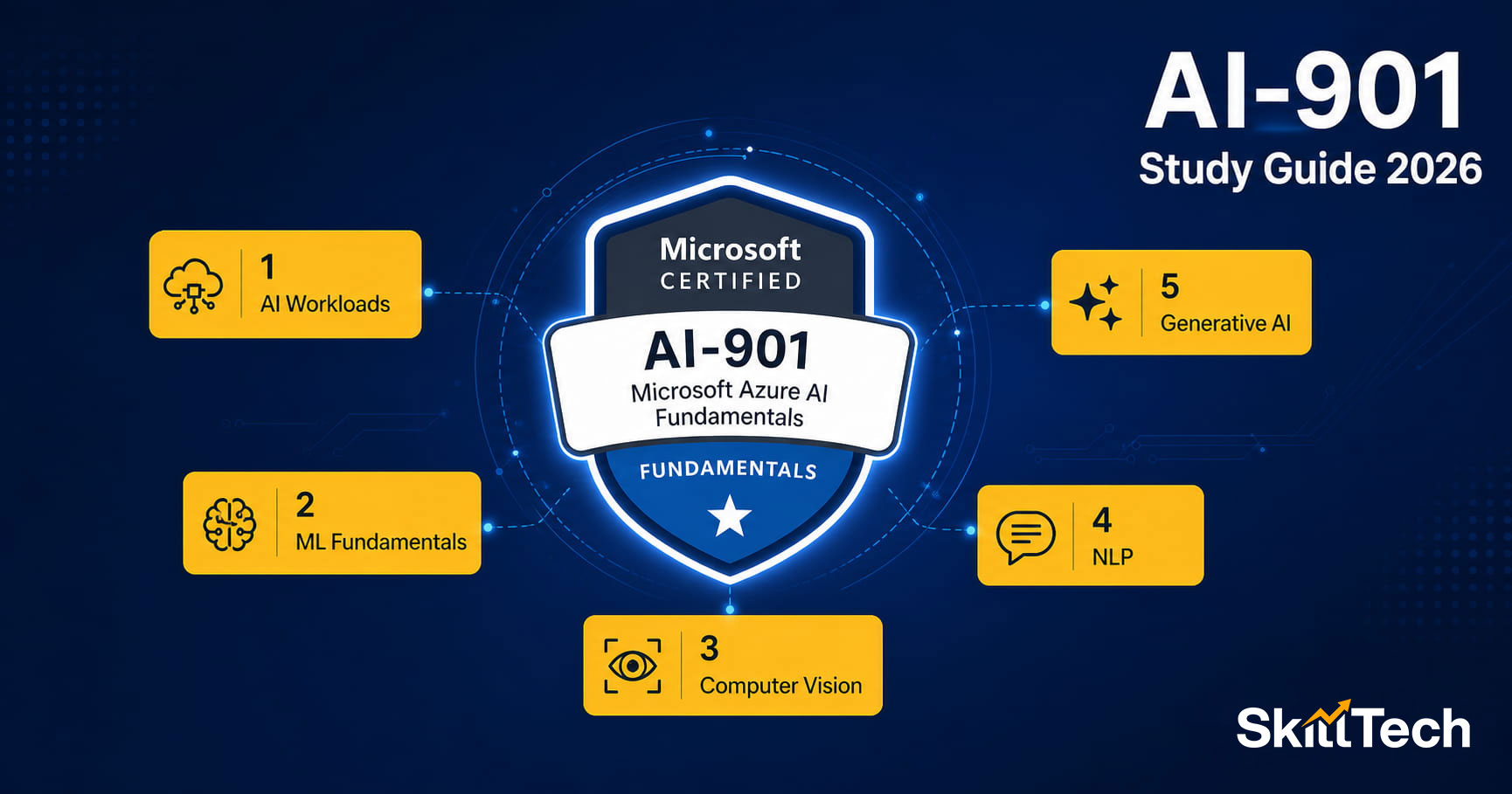
Quick answer: AI-901 is the new 2026 Microsoft Azure AI Fundamentals exam, replacing AI-900 which retired June 30, 2026. It has 5 exam domains, a passing score of 700/1000, costs approximately USD 165, and requires no coding experience. SkillTech Club offers a full AI-901 course that covers every domain.
Why this guide exists
When Microsoft retired AI-900 and replaced it with AI-901, most study guides online became outdated overnight. The AI-901 exam has new content — Azure AI Foundry, generative AI, Copilot, and AI Agents — that AI-900 never tested. If you are searching for how to prepare for AI-901 in 2026, this guide covers everything you need.
Who should take AI-901?
AI-901 is Microsoft's entry-level certification for Artificial Intelligence on Azure. It is designed for:
- Complete beginners — no cloud or AI experience needed
- Business professionals — managers, analysts, HR, marketing, finance — anyone who works with AI tools and wants to understand the technology
- IT professionals from non-AI backgrounds who want to add an AI credential
- Students and freshers starting a cloud career
- Developers who want to understand Azure AI before moving to the associate-level AI-103
You do not need to write code to pass AI-901. The exam tests conceptual understanding, not programming skills.
AI-901 exam at a glance
| Exam code | AI-901 |
| Certification earned | Microsoft Certified: Azure AI Fundamentals |
| Replaces | AI-900 (retired June 30, 2026) |
| Passing score | 700 out of 1000 |
| Duration | 60 minutes |
| Number of questions | 40–60 questions |
| Cost | USD 165 / approx. INR 4,500–5,000 in India |
| Delivery | Online proctored or test centre (Pearson VUE) |
| Prerequisites | None — open to everyone |
| Study time | 2–4 weeks (part-time) |
AI-901 exam domains — what is tested and how much?
The AI-901 exam covers 5 domains. Each domain has a percentage weighting that tells you exactly how much of the exam it represents. Study the high-weight domains first.
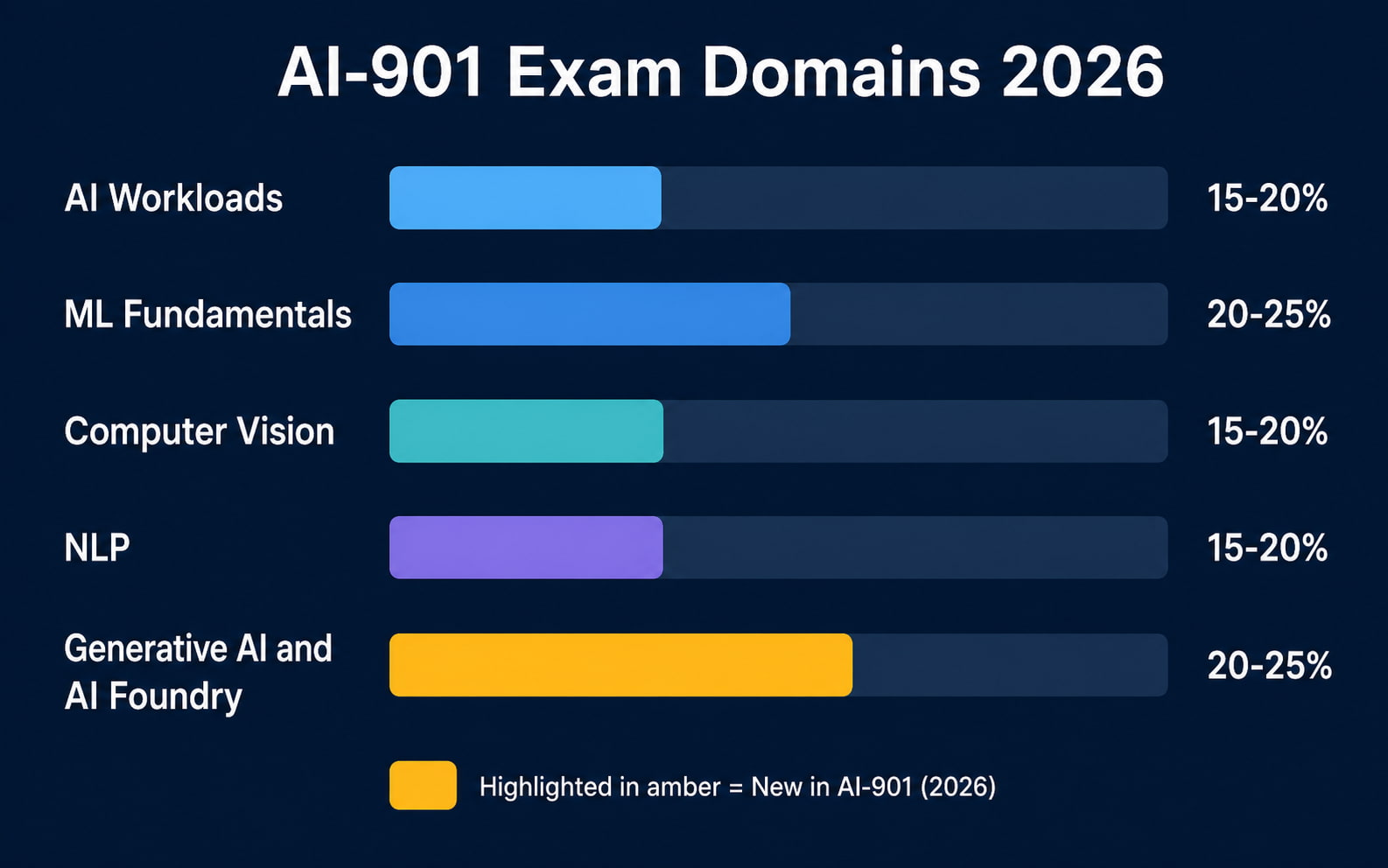
Domain 1 — AI Workloads and Considerations (15–20%)
This domain covers the types of AI workloads and when to use them. You need to understand:
- What machine learning is and the difference between supervised, unsupervised, and reinforcement learning
- What computer vision is and when to use it (image classification, object detection, OCR)
- What natural language processing (NLP) is and common NLP tasks
- What generative AI is and how large language models (LLMs) work at a conceptual level
- Principles of responsible AI — fairness, reliability, privacy, inclusivity, transparency, accountability
Study tip: Microsoft's Responsible AI principles come up in multiple domains. Learn all six principles and be able to give examples of each.
Domain 2 — Machine Learning Fundamentals on Azure (20–25%) — Largest domain
This is the highest-weighted domain. It covers:
- Core machine learning concepts — training data, features, labels, training vs testing
- Azure Machine Learning workspace — what it is and what you can do with it
- Automated ML (AutoML) — how Azure automatically tries different algorithms
- Azure Machine Learning Designer — the drag-and-drop ML pipeline tool
- Model evaluation metrics — accuracy, precision, recall, F1 score, AUC (you need to understand what these mean, not calculate them)
- Azure Machine Learning compute — compute clusters, compute instances
Study tip: Focus on what each Azure ML tool is FOR, not how to code it. Questions are scenario-based — "which Azure ML feature would you use to..."
Domain 3 — Computer Vision Workloads (15–20%)
This domain covers Azure's computer vision capabilities:
- Azure AI Vision service — image analysis, object detection, OCR, spatial analysis
- Azure Custom Vision — training your own image classification or object detection model
- Azure AI Face service — face detection and recognition use cases
- Azure AI Document Intelligence (formerly Form Recognizer) — extracting data from documents
- Video Indexer — analysing video content
Study tip: Know the difference between Azure AI Vision (pre-built) and Custom Vision (you train it with your own data). This distinction appears frequently in exam questions.
Domain 4 — Natural Language Processing Workloads (15–20%)
This domain covers NLP services on Azure:
- Azure AI Language service — sentiment analysis, key phrase extraction, entity recognition, language detection
- Azure AI Translator — text translation
- Azure AI Speech — speech-to-text, text-to-speech, speaker recognition
- Azure AI Bot Service and QnA-style knowledge bases — conversational AI concepts
- Understanding conversational AI architecture — user utterances, intents, entities
Domain 5 — Generative AI and Azure AI Foundry (20–25%) — Brand new in AI-901
This domain is entirely new compared to AI-900. It is the biggest differentiator between the old exam and AI-901:
- What generative AI is — how LLMs generate text, images, and code
- Azure OpenAI Service — Microsoft's integration of OpenAI models (GPT-4, DALL-E, Codex) into Azure
- Prompt engineering basics — what a prompt is, why prompt quality matters, system prompts vs user prompts
- Copilot — what Microsoft Copilot is, where it integrates (Teams, Word, Outlook), and its relationship to Azure OpenAI
- Azure AI Foundry — Microsoft's unified platform for building AI applications. What it includes, what you can do with it, and when to use it
- Responsible generative AI — content filtering, grounding, safety in LLM applications
- AI Agents concepts — what an AI agent is, how it differs from a chatbot
Study tip: This domain is worth up to 25% of your exam. Make sure you understand what Azure AI Foundry is, what Azure OpenAI Service is, and the difference between Copilot and a custom AI application.
4-week AI-901 study plan
This plan is designed for someone studying part-time — around 1 hour per day on weekdays. If you can study more, you can compress it to 2–3 weeks.
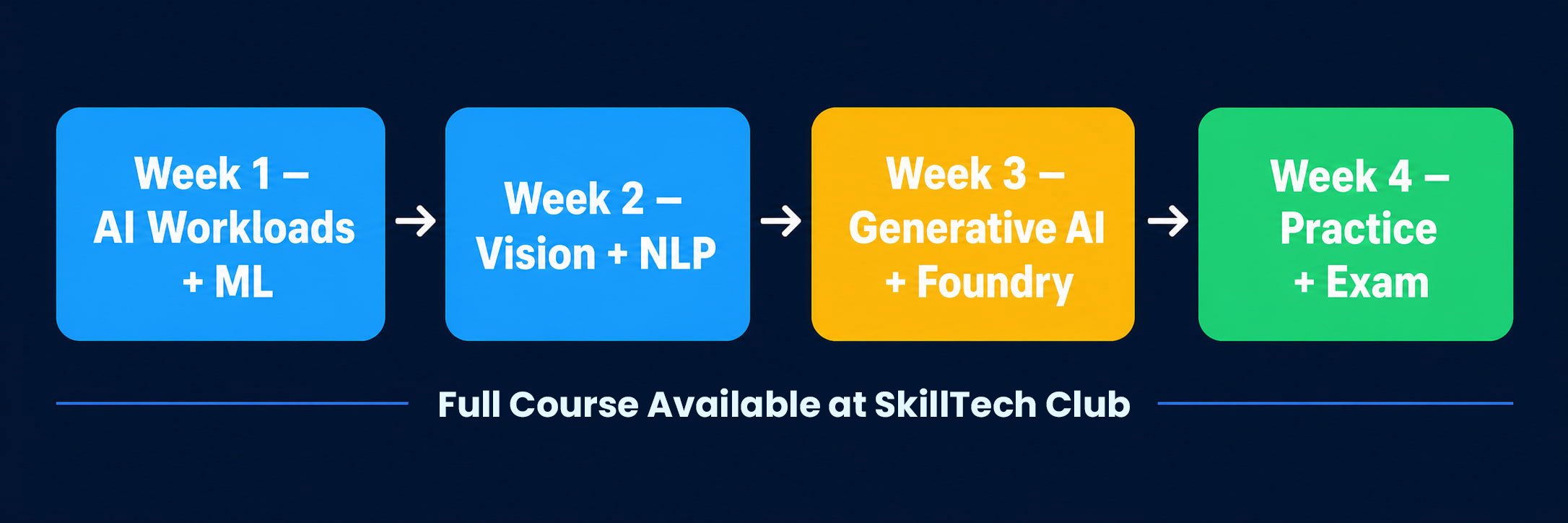
Week 1 — Foundation and ML Fundamentals (Domains 1 and 2)
- Day 1–2: AI workload types — ML, Computer Vision, NLP, Generative AI concepts
- Day 3–4: Responsible AI principles — learn all 6, with examples
- Day 5: Azure Machine Learning workspace, AutoML, Designer
- Weekend: Revision quiz on Domains 1 and 2
Week 2 — Computer Vision and NLP (Domains 3 and 4)
- Day 1–2: Azure AI Vision, Custom Vision, Face API, Document Intelligence
- Day 3–4: Azure AI Language, Translator, Speech services
- Day 5: Azure AI Bot Service, conversational AI concepts
- Weekend: Full practice quiz on Domains 1–4
Week 3 — Generative AI and Azure AI Foundry (Domain 5)
- Day 1–2: What generative AI is, LLMs, Azure OpenAI Service
- Day 3: Prompt engineering — what it is, system prompts, few-shot examples
- Day 4: Microsoft Copilot — where it works, what it does
- Day 5: Azure AI Foundry — features, use cases, what you can build with it
- Weekend: Domain 5 practice quiz + review weak areas
Week 4 — Full Review and Exam Readiness
- Day 1–2: Full practice test (all 5 domains). Identify gaps.
- Day 3–4: Targeted revision on weak domains only
- Day 5: Final light review — no new material
- Weekend: Book and take the exam
Best resources for AI-901 preparation
- SkillTech Club AI-901 Full Course — video lessons by MCT Maruti Makwana covering every domain, notes, and practice questions. Completely free. Enrol here
- Microsoft Learn AI-901 Learning Path — free official modules on learn.microsoft.com. Use these alongside your SkillTech course for maximum coverage of the official exam objectives.
- Microsoft AI-901 Exam Study Guide — the official skills measured document, available on the Microsoft Learn exam page. Always check this — it is the definitive list of what is tested.
- Practice Tests — Microsoft offers official practice tests through MeasureUp. Third-party options include Whizlabs and ExamTopics. Do at least one full practice test before booking the real exam.
Top 10 AI-901 exam tips
- Read questions carefully — AI-901 questions often have two plausible answers. The difference is in a single word like "pre-built" vs "custom".
- Know the service names — Azure AI Vision, Azure AI Language, Azure AI Speech, Azure OpenAI, Azure AI Foundry. Examiners use the official names.
- Responsible AI comes up everywhere — it appears across multiple domains. Know all 6 principles.
- Understand "when to use what" — the exam tests your ability to pick the right Azure service for a given scenario. E.g., "A company wants to extract text from scanned invoices — which service?" (Azure AI Document Intelligence)
- Azure AI Foundry vs Azure Machine Learning — these are different platforms. AI Foundry is for AI application development. Azure ML is for training custom ML models. Know the distinction.
- Generative AI is not just ChatGPT — understand Azure OpenAI Service as a separate, enterprise-grade product with security, compliance, and private deployment options.
- You will not write code in the exam — all questions are multiple choice or scenario-based. No programming required.
- Time management — 60 minutes for ~50 questions. That is about 70 seconds per question. Do not spend more than 2 minutes on any single question — flag it and return.
- Book the exam before you start studying — having a deadline is the most powerful motivator. Book 3–4 weeks out and then follow the study plan.
- Use the flag feature during the exam — flag any question you are unsure about and review it at the end. Do not leave the exam without reviewing flagged questions.
Common mistakes that cause people to fail AI-901
- Studying AI-900 material instead of AI-901 — AI-900 is retired. Its content is outdated. Domain 5 (Generative AI) alone is worth 20–25% and is completely new.
- Skipping Azure AI Foundry — many learners skip it because it feels abstract. It is not optional — it appears in exam questions.
- Not doing practice tests — reading and watching videos is not enough. You need to practice answering questions under time pressure.
- Memorising instead of understanding — the exam tests application. "Which service would you use for X?" requires understanding, not memorisation.
- Underestimating Responsible AI — it seems simple but examiners test it with nuanced scenarios. Know each principle deeply.
What to do after passing AI-901
AI-901 is a strong foundation. Once you hold it, your natural next step depends on your career direction:
- Want to build AI apps and agents? Take AI-103 — Azure AI Apps and Agents Developer Associate
- Want to manage Azure infrastructure first? Take AZ-104 — Azure Administrator Associate
- Want to understand data and analytics? Take DP-900 — Azure Data Fundamentals (free)
Start your AI-901 preparation today
SkillTech Club's AI-901 course is aliigned with official microsoft curriculum . It is taught by Maruti Makwana, a Microsoft Certified Trainer (MCT) with 18+ years of experience delivering Azure and AI training to professionals across India and globally.
The course is built specifically around the 2026 AI-901 exam objectives — including the new Domain 5 content on Azure AI Foundry, generative AI, and Copilot that most free resources still do not cover.
Summary
- AI-901 has 5 exam domains — Machine Learning and Generative AI carry the most weight (up to 25% each)
- Domain 5 (Generative AI and Azure AI Foundry) is completely new — prioritise it
- No coding required — scenario-based multiple choice questions
- Recommended study time: 2–4 weeks part-time
- Use the SkillTech Club AI-901 course + Microsoft Learn + one practice test
- Book your exam date before you start studying